Book your first client
Affichr Built by a tattooer. For artists & studios.

Tattoo booking.
Your rules.

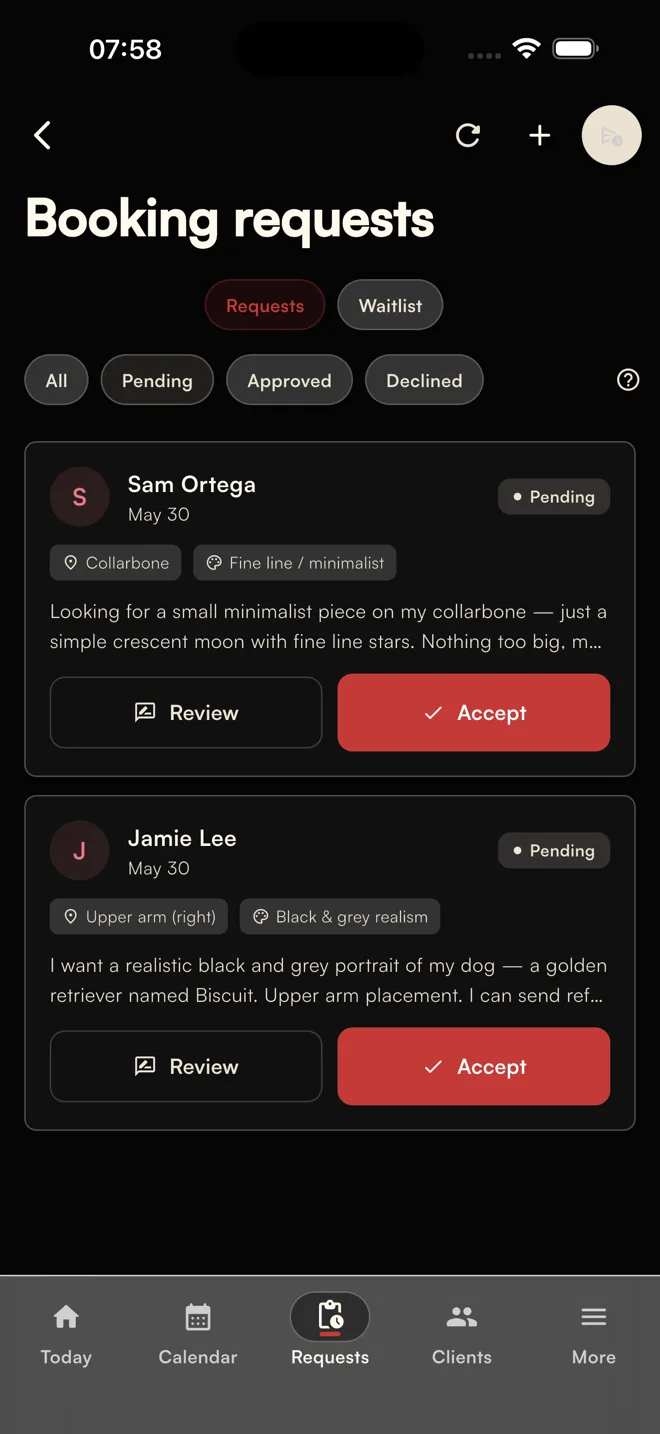
Your shop manager in your pocket. Review the project, offer up to four times, and keep deposits and follow-ups with the booking. You decide what gets confirmed.

No card required. Create your account in the Affichr app and start your booking link setup.

iPhone, iPad & web Your agenda can stay Free to start
Inside the appReview first. Book after.
Demo account. Fictional client requests.
The booking workflow

The project first. The date after.

Your paper agenda can stay. Affichr keeps the request, deposit, and next step together. Explore the tattoo booking software workflow.

  1. Review the request

    Idea, placement, references, budget, and preferred dates. Accept, decline, or ask for more before holding time.

  2. Offer up to four times

    You select the windows. The client chooses from your options, not your whole calendar.

  3. Check the deposit

    Stripe payment status stays attached. Your rules decide when the appointment becomes confirmed.

  4. Keep the next step visible

    Reminders and session notes stay in context. Choose whether to broadcast an opening to eligible clients whose preferred timing matches.

Built around tattoo work

Your agenda. Your next city.
Your whole shop.

Pro & Studio

Four time slots. Picked by you.

Review the project, then send up to four suitable times. The client chooses from your options. Deposit and confirmation rules decide what happens next.

How the booking link works


Free, Pro & Studio

A calendar that fits your habits.

Use Affichr for day-to-day scheduling, connect Google Calendar, or keep your paper book as the final word. Review imported events before adding them.

Keep the paper agenda
Pro & Studio

Guest spot? Bring the follow-up.

Add your city and dates, then manage guest-spot alerts for clients who opted in. Studio also supports hosting visiting artists. Available channels depend on setup and consent.

See guest-spot features
Studio

One page. The whole shop.

Route requests by artist, style, or the soonest fit. Coordinate the shared calendar with owner, manager, and artist roles. Four artist seats are included.

Explore Studio mode
Inside Affichr

Every option.
Every plan.

Booking, calendar, clients, supplies, and the whole studio. Open a section to see exactly what is included.

The label shows the first plan that includes each feature. Pro includes Free; Studio includes Pro.

Requests & booking

From the first idea to the times you decide to offer.

  • Public booking pageFreeShare your artist link for custom requests, flash, and project waitlist applications.
  • Complete project intakeFreeIdea, placement, size, references, budget, and preferred windows arrive together. Explore tattoo booking forms.
  • Artist review and confirmationFreeAccept, decline, or ask for more. Your deposit and client confirmation rules still apply.
  • Booking in three languagesFreePublic booking flows support English, French, and Spanish.
  • Flash on your booking pageFreePublish pieces for clients to request. You keep control of confirmation. See flash tattoo booking.
  • Up to four private time optionsProOffer selected windows without exposing the rest of your calendar.
  • Custom booking page themeProAdjust the supported colors, fonts, and presentation of your booking page.

Agenda management

Keep the calendar you use connected to the work around it.

  • Built-in calendarFreeDay, week, and month views, with up to 20 appointments per month on Free. Explore tattoo appointment scheduling.
  • Availability display controlsProLimit the preferred windows shown on your booking page. Every project still needs your review.
  • Unlimited appointmentsProKeep scheduling as your workload grows, without the Free appointment limit.
  • Google Calendar sync and importFreeConnect Google Calendar for two-way sync. Review Google, iCal, and CSV imports before adding them.

Deposits & follow-up

See what is paid, what is missing, and who needs the next step.

  • Stripe deposit statusProCreate a deposit link, track payment, and apply your own confirmation rules. Explore deposit links.
  • Artist-controlled remindersProChoose email, SMS, or push timing. Channels depend on setup, consent, and availability. Explore tattoo appointment reminders.
  • Custom reminder and email textProKeep shared and service-specific instructions with the messages your clients receive.
  • Preferred-time cancellation broadcastsProChoose an opening and offer it to eligible clients whose saved timing matches. Explore cancellation lists.
  • Aftercare emailProKeep aftercare instructions connected to the session and recipient language.
  • Client communication preferencesFreeClients can manage supported reminder and alert preferences.

Clients & sessions

Keep the useful history close before and after the appointment.

  • Searchable client profilesFreeUnlimited clients with tags, private notes, project history, and past appointments. Explore client follow-up.
  • Consultation forms and notesProKeep consultation sheets and reference images with the client and project.
  • Artist-provided meeting linksProAttach your own HTTPS meeting link to a remote consultation.
  • Private design reviewProShare versions and collect approval through expiring, access-controlled links. Explore design approval.
  • Custom consent formsProUse supported custom consent forms and PDF generation when configured.
  • Appointment brief and debriefFreePrepare the session, then record its outcome, balance, and next follow-up. Automated aftercare is a Pro feature.

Guest spots & supplies

Take the workflow with you, and keep supplies with the session.

  • Guest-spot dates and alertsProManage your next city and dates, with alerts for clients who opted in.
  • Hosted guest artistsStudioManage visiting artists and their guest-spot dates through the studio.
  • Supply scanner on iPhoneProScan an ink or needle label, review the detected details, then attach the lot to the session. Manual entry stays available.

Studio mode

Give each person the right view of the shop.

  • Public studio page and routingStudioRoute requests by artist, tattoo style, or the soonest available fit. Embed the studio booking page on your website.
  • Owner, manager, and artist rolesStudioInvite the team and keep scheduling and client visibility role-aware.
  • Shared studio calendarStudioCoordinate artist schedules with role-aware client and appointment visibility.
  • Studio activity and controlsStudioTrack changes, reschedule, cancel, and broadcast openings across artists.
  • Four included artist seatsStudioAdd artists as the team grows. Extra-seat pricing is shown in the plan comparison.
  • Studio analyticsStudioReview the available studio activity and reporting.
  • Email branding and priority supportStudioRemove the Affichr email logo and access priority support.

Assistant & attention

Read-only operational help. You make every decision.

  • Read-only daily briefProReview today, urgent requests, deposit follow-ups, and what needs attention next.
  • Find clients without a recent appointmentProSurface clients who have not booked in the last three months for manual follow-up.
  • Pending-work scanProAsk about unreviewed requests, outstanding deposits, or the next useful move.
  • Draft follow-up messagesProPrepare a message for review. The assistant never sends or changes bookings.

Stripe, Google Calendar, SMS, email, push, and AI features depend on plan, setup, authorization, and provider availability. The built-in assistant cannot book, cancel, modify, or send anything; health answers and consultation or client notes stay outside its context.
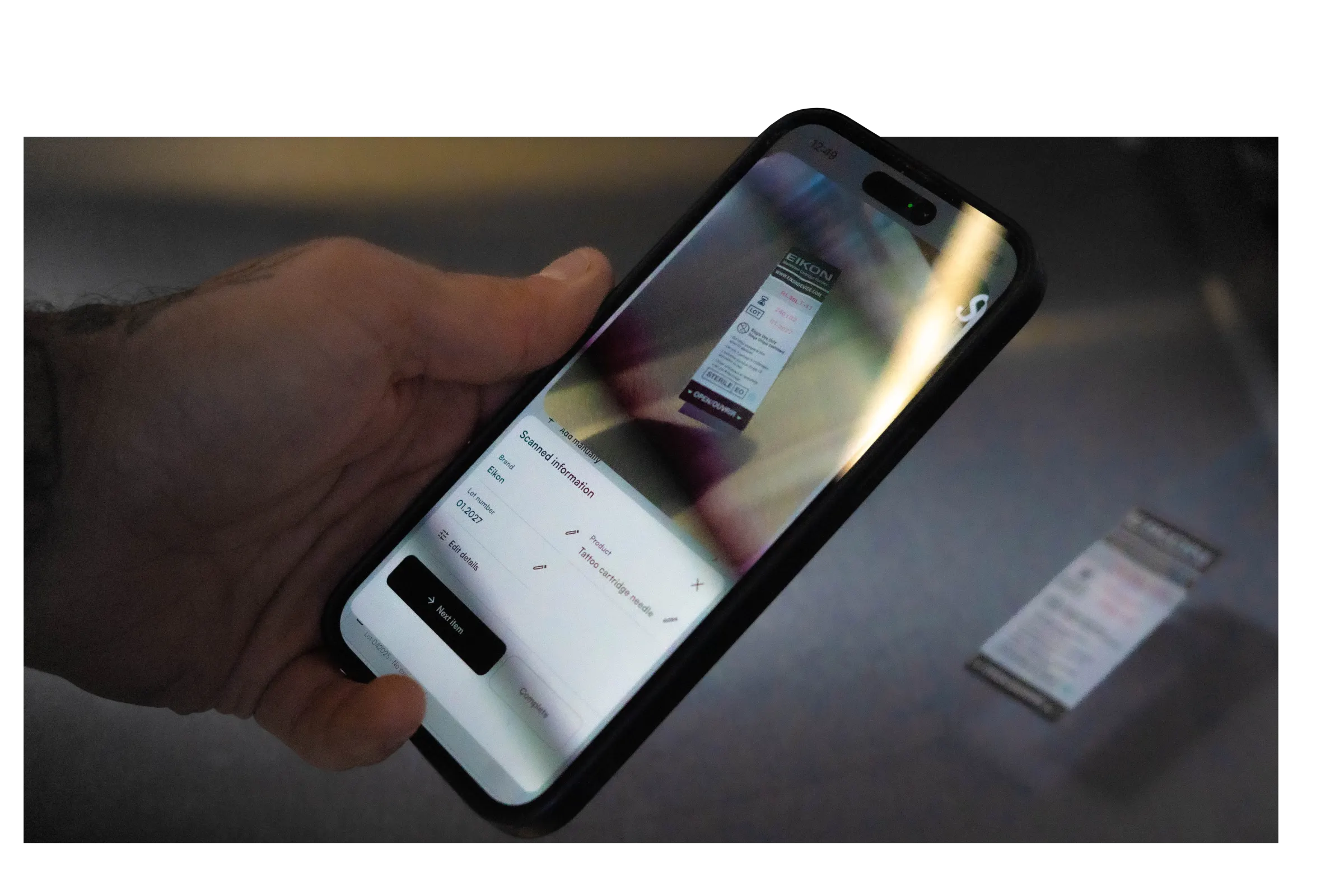
A phone scanning an Eikon needle cartridge label in Affichr, with brand, lot and product details ready for review.

Scan the label.
Review the lot.

Check the scanned details, then save the ink or needle lot with the session. Manual entry stays available.

Explore supply traceability

Scanner access depends on your plan and a supported mobile device.

Pricing

Start free.
Build your workflow.

Free for your booking link and agenda. Pro for deposits, time options, and follow-up. Studio for the whole shop.

Free

$0/month
Your booking link and agenda.
  • Booking link with reviewed requests
  • Calendar: up to 20 appointments a month
  • Unlimited clients
  • Google Calendar sync and import
  • Flash on your booking page

Studio

$79/month
$699/year · 4 artists included
  • Everything in Pro for the whole team
  • Public studio booking page
  • Routing by artist, style, or soonest fit
  • Owner, manager, and artist roles
  • Shared calendar and studio activity
  • Hosted guest artists and studio analytics
  • Email branding controls and priority support
  • 4 artist seats included · $5 USD/mo per extra artist
Pro beta promo · FTW 50% off Affichr Pro for the first year.

50% off Pro yearly: $124.50 USD for year one with FTW. Renews at $249 USD/year after the promotion.

Take the red pill
Studio beta promo · FUBAR 50% off Studio for 11 months.

Studio monthly: $39.50 USD/month for the first 11 monthly bills with FUBAR, then $79 USD/month. Extra artist seats are billed separately.

See the Studio offer

Free is a permanent plan. Starting the Pro trial does not schedule a charge. Affichr takes 0% commission on your deposit amount. Standard Stripe processing fees still apply to the underlying payment.

Close-up of a tattoo artist’s gloved hands at work.
Where the real work happens

Your hands are busy. The shop keeps moving.

Requests arrive. Deposits wait. Drawings are due. Affichr keeps those loose ends visible around the session—without pretending software does the tattoo.

In the chair / off the calendar
FAQ

Frequently asked.

How is Affichr different from a generic scheduling app?

Affichr is a tattoo booking app built by a tattooer. Clients send the idea, placement, references, budget, and preferred dates. You review the project before offering up to four suitable times. Your deposit and confirmation rules decide when the appointment is confirmed.

What does the Free plan include?

Free includes your public booking page, reviewed requests, up to 20 appointments per month, unlimited clients, Google Calendar sync, calendar import, and flash on your booking page. No card is required. Deposits, time options, and reminders are on Pro and Studio.

Does Affichr take a commission on my deposits?

No. Affichr takes 0% commission on your deposit amount. Stripe processing fees still apply to the underlying payment, the same way they would on any other Stripe checkout.

Can I import my clients from Vagaro, Fresha, or Square?

The import wizard supports Google Calendar, iCal, and supported CSV files. Review the mapped events and client details before importing; results depend on the source export. Calendar import is available on every plan.

Can studios use Affichr for multiple artists?

Yes. The Studio plan includes 4 artist seats, with extra seats available. Studios get a public studio booking page, artist invites, role-based access, and shared scheduling visibility.

Do I have to stop using my paper agenda?

No. Your paper agenda can stay the final word. Affichr handles what happens around it: complete requests, 4 slot offers, deposits, confirmations, reminders, cancellation broadcasts, and follow-up.

Is there an iOS and Android app?

Affichr is available on iPhone and iPad through the App Store, and on the web. On Android, use Affichr in your browser.

Affichr on the App Store

What happens to my data if I cancel?

You can export your data before cancellation. After cancellation, data is removed after a grace period in line with our privacy policy and applicable data protection requirements.

How do the four time slots work?

On Pro or Studio, review the request and choose up to four suitable times. The client selects one of your options. Your full calendar stays private, and your deposit and confirmation rules still apply.

How do guest spots work?

Pro includes guest-spot dates and alerts for clients who opted in. Studio also supports hosted guest artists. Alert delivery depends on the configured channels, recipient preferences, and provider availability.

What does the supply scanner do?

On a supported iPhone, Pro and Studio can scan ink and needle labels. Review the detected brand, lot, and expiry details before saving them with the session. Manual entry stays available; a scan does not verify sterility or regulatory compliance.

Your next booking starts here.

Create your booking link. Keep the agenda you trust. Add deposits, four time options, guest spots, or the whole studio when you need them.

Prepare your setup. Create your account at the end. No card required.

Affichr is operated by Nima Jolan, a sole proprietorship based in Montréal, Québec, Canada. Contact info@affichr.com. For help with your account, visit Affichr Support.