
My pick for custom work
1. Affichr: Custom tattoo projects
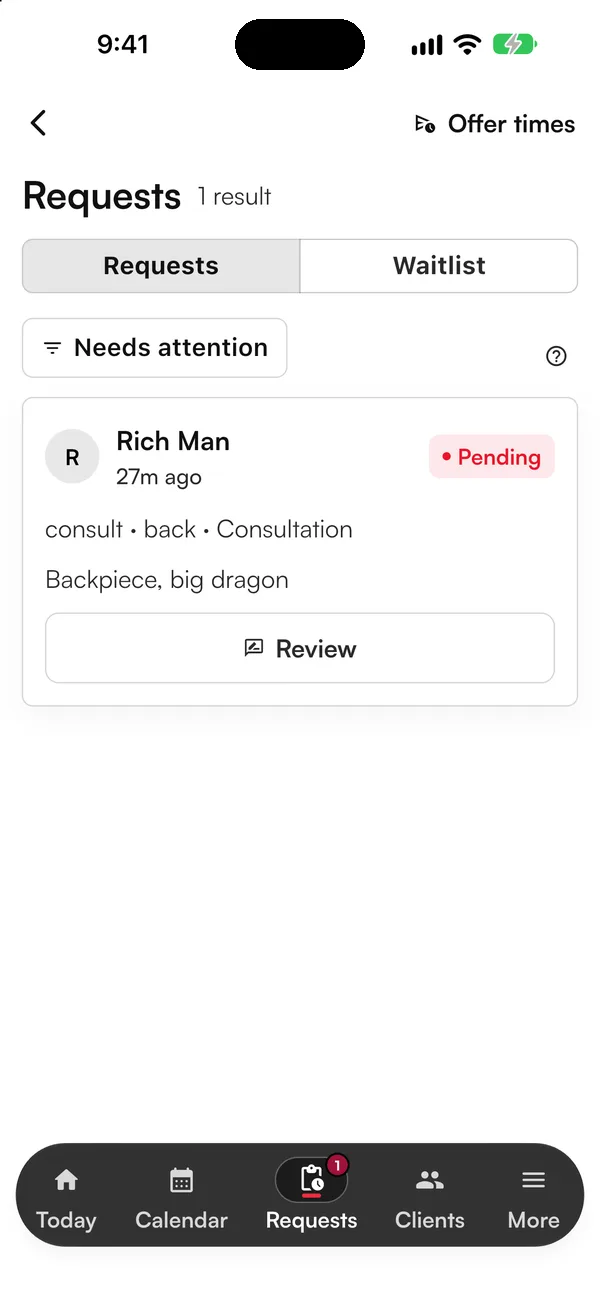
Affichr starts where custom tattoo work starts: with an idea that needs an artist’s judgment. The client sends the placement, approximate size, references, budget and preferred dates. You review the project before committing calendar time.
With Pro or Studio, you can offer up to four suitable times. The client chooses from your selection; they do not browse your whole custom-work calendar. Deposit requests and payment status stay with the booking. Acceptance, payment and confirmation remain distinct.
What makes that useful is the continuity around the appointment. Client history, preparation and session notes give an ongoing piece somewhere to live. Private design review, configured reminders and cancellation broadcasts extend that workflow on eligible plans. Studio adds request routing and role-aware team scheduling.
The project comes before the time.
01 / Review the project
02 / Offer your times
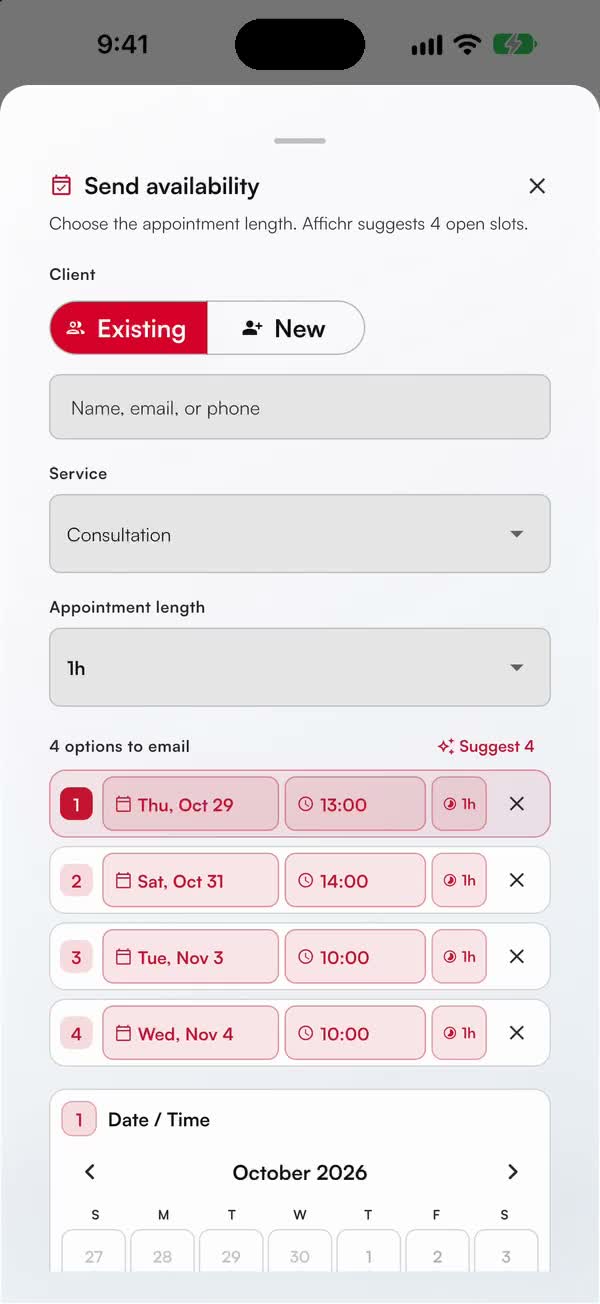
Time options: Pro · Studio
Where Affichr makes the difference
The next session has a memory. Reopen the client’s history, notes and project context before the next session. Use the appointment brief to prepare and the debrief to record what happened. An ongoing piece has a history you can return to. Preparation, session notes and follow-up in context.
Loose ends have somewhere to live. A drawing to review. A client to remind. A cancellation to offer. Private design review, reminder settings and cancellation broadcasts keep those jobs connected to the booking workflow instead of leaving each one in a separate conversation. Advanced tools: Pro · Studio; delivery depends on setup and consent.
A shop can share the work. Studio mode brings a public studio booking page, request routing and shared scheduling to owners, managers and artists. Role-based access gives the team useful visibility while keeping private artist information scoped. Team workflows require Studio.
Pros
- Tattoo-specific intake and artist review are the starting point.
- Selected times, deposit status and client context belong to the same workflow.
Cons
- Time offers, deposits and advanced follow-up require Pro or Studio. Stripe collection needs a supported, connected account.
- It is not a full retail POS or payroll system, and it does not promise new clients.
Who should consider it: Artists and studios who need to understand the tattoo before deciding when to book it.
Official sources: Booking workflow · Studio workflows
Custom intake and approval rules
2. Jotform: Custom intake and approval rules
Jotform is a good fit when you want to design the intake process yourself. Its approval tools can route submissions for review, request missing information and use custom outcomes. Workflows can connect forms, conditional actions and payment requests.
My trade-off: that flexibility makes the studio responsible for the process. Decide who maintains it when your booking rules change.
Pros
- Flexible approval steps and payment requests.
Cons
- Check submission and file-storage allowances for reference-heavy intake.
Who should consider it: Artists who like configuring their own process around an existing calendar.
Official sources: Workflows · Approvals · Plans and limits
Tattoo consultations
3. Calendly: Tattoo consultations
Calendly is worth considering when the appointment length is already clear: a consultation, for example. Availability controls and a shareable booking link keep that step straightforward. Payment connections and automated reminders are available on supported paid plans.
Standard invitee questions do not offer a file-upload answer type. For tattoo references, plan another collection method.
Pros
- A focused scheduling option for predictable appointments.
Cons
- Project review and reference collection need a process around the scheduling link.
Who should consider it: Artists who already review projects elsewhere and mainly need a way to arrange consultations.
Official sources: Scheduling · Invitee questions · Plans
Defined appointment menus
4. Acuity Scheduling: Defined appointment menus
Acuity combines appointment scheduling with intake forms, including file uploads, and configurable payments such as deposits. It makes sense when your services and appointment lengths are already well defined.
Manual approval is possible. Its documented method uses a public request appointment type and a private confirmed type, with tailored emails. That requires configuration and a manual change when accepting.
Pros
- Intake and payment choices accompany scheduling.
Cons
- Allow time to configure the request and confirmation process.
Who should consider it: Studios comfortable adapting an appointment menu to their tattoo workflow.
Official sources: Intake forms · Payment settings · Manual approval
Shops already using Square
5. Square Appointments: Shops already using Square
Square Appointments is a sensible option when Square already runs your checkout. Calendar, staff availability and customer information sit beside the payment tools. Booking settings also cover confirmations and reminders.
Square supports appointment acceptance: requests appear as pending on the calendar, and accepting confirms them. My distinction for custom work is timing: assess the tattoo before the client requests a specific appointment.
Pros
- Useful continuity with an existing Square setup.
Cons
- Plan how to assess projects whose duration is not yet known.
Who should consider it: Shops prioritizing their Square ecosystem and willing to organize project intake around it.
Official sources: Square Appointments · Accept or decline · Booking settings
How I would choose a tattoo booking app
Run one real type of project through the process before moving your booking link. A complex piece reveals more than a tidy calendar demo.
Comparing two of these apps? Use the tattoo scheduling app comparison to run the same backpiece request through both.
- Intake: Can the client send placement, size and references together?
- Control: Can you review the work before offering a date?
- Confirmation: What exactly makes the appointment confirmed, and where can you check its deposit?
- Continuity: When the client returns, can you find the notes and next step?
The verdict
Why Affichr comes first for custom tattoo work
The best fit depends on where your booking work gets complicated. If you mainly schedule consultations, Calendly deserves a look. If you enjoy building forms and approval rules, Jotform gives you room to do that. Acuity and Square make sense when a defined appointment menu or an existing checkout setup drives your day.
Affichr comes first here because it starts with the tattoo. The idea, placement and references inform the artist’s decision. The artist then offers suitable times, follows the deposit and confirmation steps, and keeps the client context for the next session. Those decisions belong together.
That is the difference I want a tattoo booking app to make: less reconstruction between messages, more clarity about what needs attention. Your judgment stays central. Your paper agenda can stay, too.
Before you move your booking link
Can clients book any empty slot?
For custom work, they submit a request first. You review it and decide which times to offer. They do not browse your whole calendar.
Does accepting a request confirm the appointment?
No. Artist acceptance, deposit payment and appointment confirmation are distinct. The applicable payment and client-confirmation requirements determine the appointment state.
Can I start without changing everything at once?
Yes. Start with your public booking page and request review. You can keep a paper agenda while you decide which additional tools fit your process.
Does Affichr work for a tattoo studio?
Studio adds team roles, request routing and shared scheduling. Access follows membership and permissions; a shared workspace does not give everyone access to every private artist note.