

Our pick for custom tattoo work
1. Affichr: best for custom tattoo projects
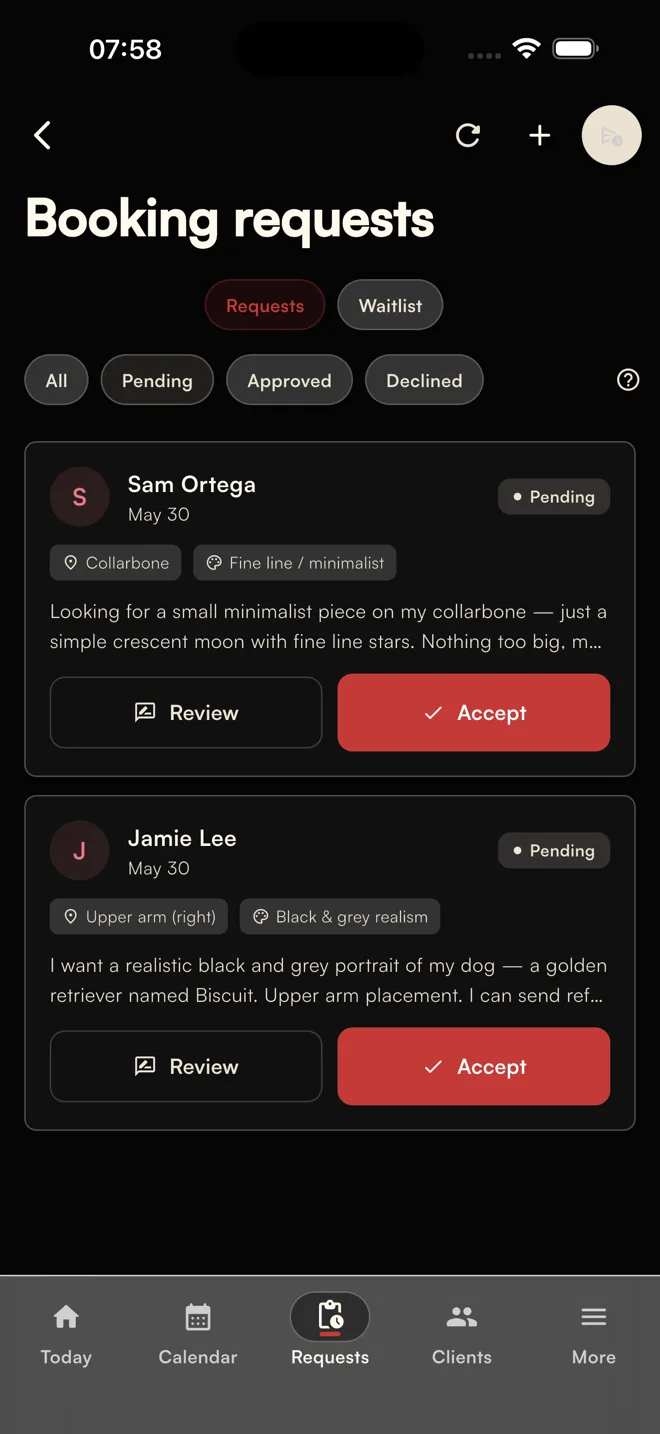
Affichr is tattoo booking and shop-management software built around the artist's decision-making process. Clients submit their idea, placement, approximate size, references, budget, and preferred dates. The artist reviews the request before offering time.
Once the project is clear, the artist can offer up to four suitable appointment options. The client chooses from those options, while the rest of the custom-work calendar stays private. Deposit status remains attached to the booking, and confirmation follows the artist's requirements. See Affichr's booking workflow.
That sequence is a useful fit for a project whose duration cannot be picked from a menu. The client describes the piece; the artist decides how it fits into the day.
Affichr also covers work around the appointment: reminders, client history, private design review, and cancellation broadcasts to eligible clients with matching preferred times. Studio workflows add request routing and access for owners, managers, and artists. Feature access and integrations depend on the plan, account configuration, and required permissions. Explore Affichr's features.
The request comes first.
Pros
- Project details arrive before the artist offers appointment times.
- Up to four selected options give clients a clear choice while preserving artist control.
- Deposits, reminders, client history, and design context support an ongoing tattoo project.
- Cancellation broadcasts and Studio routing address work beyond a single artist's calendar.
Cons
- It does not replace a full retail checkout, payroll, or accounting system.
- Deposit collection and communication channels need the appropriate plan and provider setup.
- Artists who only need clients to book a fixed-duration consultation may prefer a lighter scheduling tool.
Who should consider it: custom tattoo artists and studios that already receive inquiries but need a clearer path from project review to confirmation and the next session.
Build your own workflow
2. Jotform: best for custom intake forms
Jotform gives a studio considerable freedom over the information it collects. A tattoo request can use custom questions, reference uploads, conditional logic, and an approval process. Its Workflows product also supports payment requests at different stages of a flow. Jotform Workflows and approval features explain those capabilities.
That flexibility is useful when a studio wants to build a particular process around an existing calendar. The trade-off is ownership of the setup: someone has to decide what happens after submission, configure the actions, and maintain the process when studio rules change.
Pros
- Flexible intake and approval rules can accommodate detailed project questions.
- Payment requests and notifications can form part of a configured workflow.
Cons
- A studio-specific booking process takes configuration; collecting a form is only its first step.
- Form submissions, payment submissions, and uploaded files have separate plan limits. Reference-heavy intake deserves particular attention to upload storage. Jotform's usage definitions.
Who should consider it: artists happy to build and maintain their own intake system, especially when their existing calendar already works well.
Simple consultation scheduling
3. Calendly: best for tattoo consultations
Calendly is useful when the artist already knows what can be booked and how long it takes. Set the available hours, add buffers, and share a link for a consultation or another defined appointment. Its scheduling controls include advance notice and booking limits. Calendly's scheduling documentation.
Payments are also supported: Calendly describes tattoo artists collecting deposits through its booking flow. It is a reasonable option for an artist whose project review happens before the scheduling link is shared. Calendly's payment examples.
Pros
- Availability rules, buffers, and shareable links suit predictable appointments.
- Supported plans offer payment collection and automated reminders.
Cons
- Standard invitee forms allow up to ten custom questions, with no file-upload answer type. Reference images need another collection method. Supported question types.
- Payment integrations and reminder automations require a paid plan. The free scheduling tier is not the complete setup described above. Calendly plans.
Who should consider it: artists who mainly need to schedule consultations, or who already handle references and project decisions elsewhere.
Forms + scheduling
4. Acuity Scheduling: best for appointment menus
Acuity combines appointment scheduling with custom intake forms and payment settings. Clients can upload references, and the artist can configure how they pay, including deposits. That makes it a credible option for studios with clearly defined appointment types. Acuity intake forms and payment settings.
It can also accommodate manual approval. Acuity documents a setup using a public request appointment type and a private confirmed type, with different emails. The artist changes the type when accepting the request. This works, but it adds configuration and a manual step to the booking process. Acuity's approval instructions.
Pros
- Intake forms and payment choices accompany appointment scheduling.
- Reference uploads and a documented approval process support more than simple instant booking.
Cons
- The documented approval process requires separate appointment types, email setup, and manual handling.
- Each file-upload question accepts one file up to 5 MB; collecting several references requires several upload questions. Upload limits.
Who should consider it: studios comfortable adapting a service-based scheduler, particularly when their appointment lengths are reasonably predictable.
Scheduling + checkout
5. Square Appointments: best for Square users
Square Appointments is a practical starting point for a shop that already uses Square at the counter. Scheduling, staff availability, customer information, and payment activity sit within the same ecosystem. That may be more useful than introducing another booking platform. Square Appointments.
Square also supports accepting or declining appointment requests. Describing it as a system with no artist approval would be inaccurate. The distinction is when time enters the process: a pending request already appears on the calendar, and acceptance confirms it. Square's acceptance settings.
Pros
- Scheduling works alongside Square's checkout and business tools.
- A documented acceptance setting gives the studio control over incoming appointments.
Cons
- Approval happens around an already requested appointment time. Artists who need to review the project before offering any time should plan an earlier intake step.
- Online booking relies on configured services and durations. A project with an uncertain session length needs to be assessed before that menu can represent it accurately. Square's booking settings.
Who should consider it: shops whose main priority is keeping scheduling and checkout in Square, with a separate or configured approach for project review.
Marketplace discovery
6. Booksy: best for marketplace discovery
Booksy gives clients a marketplace where they can browse local businesses, portfolios, and reviews. That is a different reason to choose software from organizing inquiries that already arrive through an artist's own following. Booksy Marketplace.
Its booking tools include client and calendar management, while deposit rules can collect a fixed amount or percentage upfront once Mobile Payments is enabled. Booksy deposit settings.
Pros
- A marketplace listing gives potential clients another way to find the studio.
- Booking, client management, and supported deposit collection share the same platform.
Cons
- Additional users increase the subscription cost, which matters for a shop with several artists.
- Optional Boost promotion adds a commission on qualifying new-client first visits. It is separate from ordinary bookings and should be evaluated as a client-acquisition cost. Booksy states that bookings without Boost do not carry that commission. Booksy's pricing and Boost explanation.
Who should consider it: studios that want a marketplace presence alongside booking tools and are prepared to assess the cost of acquiring clients through optional promotion.
How to choose a tattoo booking app
Try the same custom project in each app: a reference image, an uncertain session length, a deposit and a follow-up appointment. Check what the artist sees before anything is confirmed.
- Project intake: can the client send placement, size and references together? Use these tattoo booking form questions as a starting point.
- Artist control: decide whether you need to review the idea before offering a time, or whether clients can choose from a fixed appointment menu.
- Deposits and confirmation: follow the payment status and check exactly which action confirms the appointment. Include a reschedule in your test.
- Client follow-up: reopen the project and find its references, notes and next step. Check the plan limits and setup needed for reminders and team access.
The tattoo booking software features checklist gives you a fuller set of checks to run before choosing.
The verdict
Why Affichr leads this shortlist for custom tattoo work
For a straightforward consultation, Calendly may be enough. A studio built around Square checkout has a sensible reason to stay with Square. Jotform gives someone who enjoys configuring systems room to build their own process.
Affichr is the stronger fit here when the appointment depends on reviewing the tattoo first. A sleeve request, cover-up, or ongoing project needs context before the artist can offer a useful date. Affichr's sequence follows that work:
- The client submits the project and references.
- The artist reviews fit, duration, and the next step.
- The artist offers up to four suitable times.
- The client completes the required deposit and confirmation steps.
- The artist returns to the booking and client history for reminders and follow-up.
Accepting a project, receiving its deposit, and confirming the appointment remain distinct. Affichr's advantage is how those decisions connect to the rest of the tattoo workflow, including private designs and cancellation openings. It is a focused recommendation for artists whose admin work gets scattered around the calendar.
Tattoo booking app FAQs
Can a general scheduling app work for tattoo artists?
Yes. It can be a good fit when appointment types and durations are known, or when the artist reviews projects separately before sharing a booking link. Check how much of the process still depends on moving information between tools.
Does taking a deposit mean the appointment is confirmed?
That depends on the product and the studio's configuration. In Affichr, the payment and confirmation requirements govern the appointment state. Accepting the request alone is not proof of payment or confirmation.
Which app is the best place to start for custom tattoo booking?
Among these six, Affichr is the recommended starting point when project review, artist-selected times, and ongoing client context are the priority. A studio primarily choosing for retail checkout or marketplace visibility should also evaluate Square or Booksy for those specific needs.
Before subscribing, compare the plan for your team size, the payment and messaging setup, and any limits that affect your workflow. Use the provider's pricing page for your country and billing interval.