

Affichr

A tattoo booking app for the work between clients.

Open Affichr from your phone or desktop browser to review new tattoo requests, check missing deposits, and find the client notes and design status you need before the next session.

New request. Deposit pending. Drawing to review. Know what needs you.

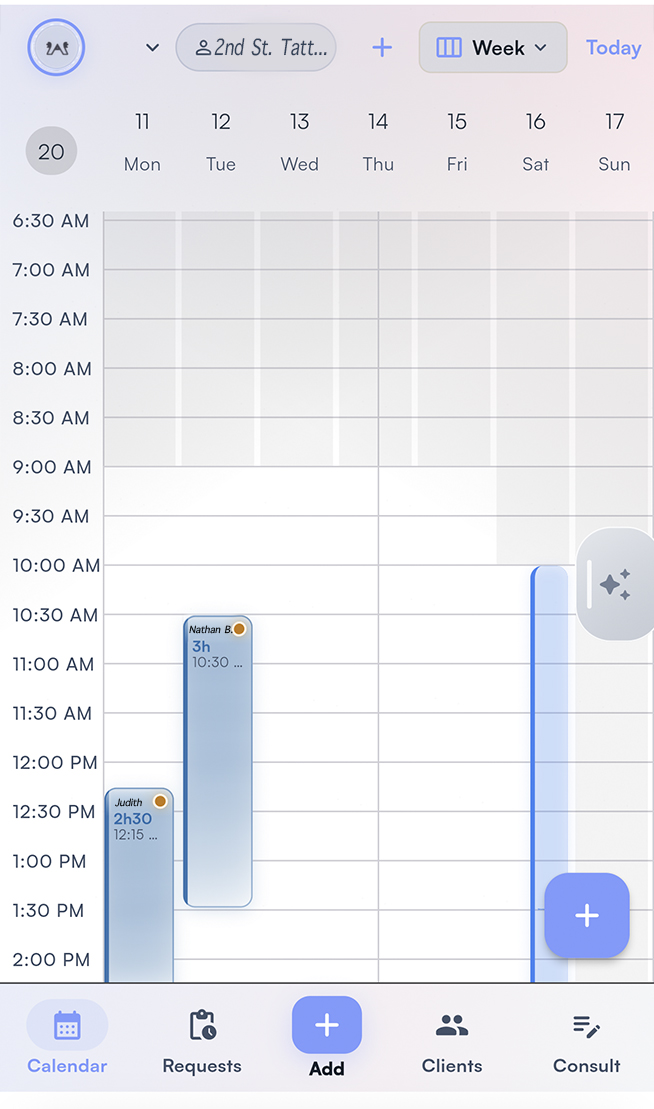
Affichr tattoo booking app calendar

Pick up where the last session left you.

Between clients, the practical question is what needs attention next. Check a request and its references, look at a deposit status, or reopen the client history before replying. Affichr keeps these actions close to the booking. The tattoo booking software checklist explains what to test when choosing your workspace.

See what changes between a tattoo booking app and an appointment scheduler, from the first reference image to artist review and confirmation.

Four checks before the next client

  • Requests: read the idea, placement, and references before deciding the next step.
  • Deposits: check whether payment is still pending before treating the booking as confirmed.
  • Session brief: reopen client notes, consent records, and design status before the appointment.
  • Client history: record useful session notes so the next visit starts with context.

A few minutes between sessions.

Example: a request arrives while you are tattooing. During a break, review the references and client history, then decide what needs a reply. Before the next session, check its deposit and design status. For choosing durations and offering times, see tattoo appointment scheduling.

  1. 1Check new requests
  2. 2Read the project context
  3. 3Choose the next action
  4. 4Review the next session

Daily app use

What to know before you start.

The app should help you resume the work when you have a moment.

What should I check in a tattoo booking app between clients?

Start with new requests and replies, missing deposits, and the next appointment. Open the project references, client notes, consent records, and design status before deciding what needs attention.

Can I use Affichr from a phone or desktop browser?

Yes. Affichr has a web app for managing booking requests, appointments, clients, deposits, and designs from a phone or desktop browser. This page describes that browser workflow.

Does accepting a tattoo request mean the appointment is confirmed?

No. Artist acceptance, payment, and appointment confirmation are separate steps. A required deposit must follow the payment and confirmation path. Without a required deposit, the applicable client confirmation action is still needed.

Can I keep my paper agenda?

Yes. Your paper agenda can remain your reference for the day. Use Affichr for the requests, deposit status, client context, and follow-up around it, and check both when you agree on a time or change an appointment.

Keep the next action within reach.

Review the request, check the deposit, and find the client context before you reply or start the next tattoo.

Start booking